Muviz Edge: AOD & Edge Lights
- 4.5
- Rating
- 10.00M
- Installs
- Free
- Price

 Analysis by App-foxy
I spent time with Muviz Edge: AOD & Edge Lights as a personalization app, mainly to see whether its visual effects feel useful in daily life or simply become another layer of decoration. My overall impression is that it works best when you want your phone to feel more expressive without replacing the launcher, lock screen, or notification system you already use. It adds a visual identity around the display and can make music playback feel more alive, but it also asks you to accept a little extra setup and a little more activity on the screen.
The app comes from Sparkine Labs, the developer behind Muviz, and it has built a sizeable audience: more than ten million installs, an average rating of 4.5 from roughly 163 thousand ratings, and about 1.7 thousand written reviews. Those figures suggest that the concept has broad appeal, although popularity does not remove the practical questions. You still need to decide whether always-on visuals suit your phone, whether you enjoy edge lighting, and whether the free version gives you enough room to personalize the experience.
It is free to install and suitable for everyone, with optional in-app purchases ranging from $0.99 to $4.99 per item. The current version is 2.1.4.0, and the app supports Android 9 and later. That makes it accessible to many existing phones, but the experience can still vary depending on the display, system settings, battery controls, and the way a particular manufacturer handles overlays or always-on features.
You May Also Like

 Pandora - Music & Podcasts
Pandora’s Music Is Easy to Start, but Harder to Recover
Pandora’s strength is its low-effort path from a seed to a station. Its weak spot is how much confidence it asks you to place in connection, setup, and quiet recovery.

 AccuWeather: Weather Radar
AccuWeather Review: A Quick, Clear Forecast for Everyday Decisions
For everyday plans, the best forecast is the one you can understand quickly. AccuWeather makes rain timing, radar, and local conditions easy to act on, with a few trade-offs.

 Hill Climb Racing
Why Hill Climb Racing Still Turns Crashes Into One More Run
A tiny car, a bumpy hill and one more upgrade: Hill Climb Racing keeps resurfacing because its simple chaos makes every near-miss feel personal.

 AliExpress - Shopping App
AliExpress Makes Global Shopping Feel Personal, but Shoppers Bear the Risk
AliExpress turns a global marketplace into a pocket-sized discovery engine. Its reach is useful, its shopping loop compelling, and its trade-offs easy to miss.

 Lords Mobile: Kingdom Wars
Lords Mobile Is a Kingdom-Building Routine, Not a Quick Match
A case-by-case verdict on the building, battles, device demands, and social commitments that make Lords Mobile rewarding for some players and exhausting for others.

 PDF Scanner app - TapScanner
TapScanner Makes Paperwork Easier to Capture, Check, and Share
TapScanner makes scanning with a phone feel less like a rescue operation and more like a dependable step in getting work done. Its capture tools are useful, though not flawless.
More From Our News Desk
View All News


How the current experience feels in everyday use
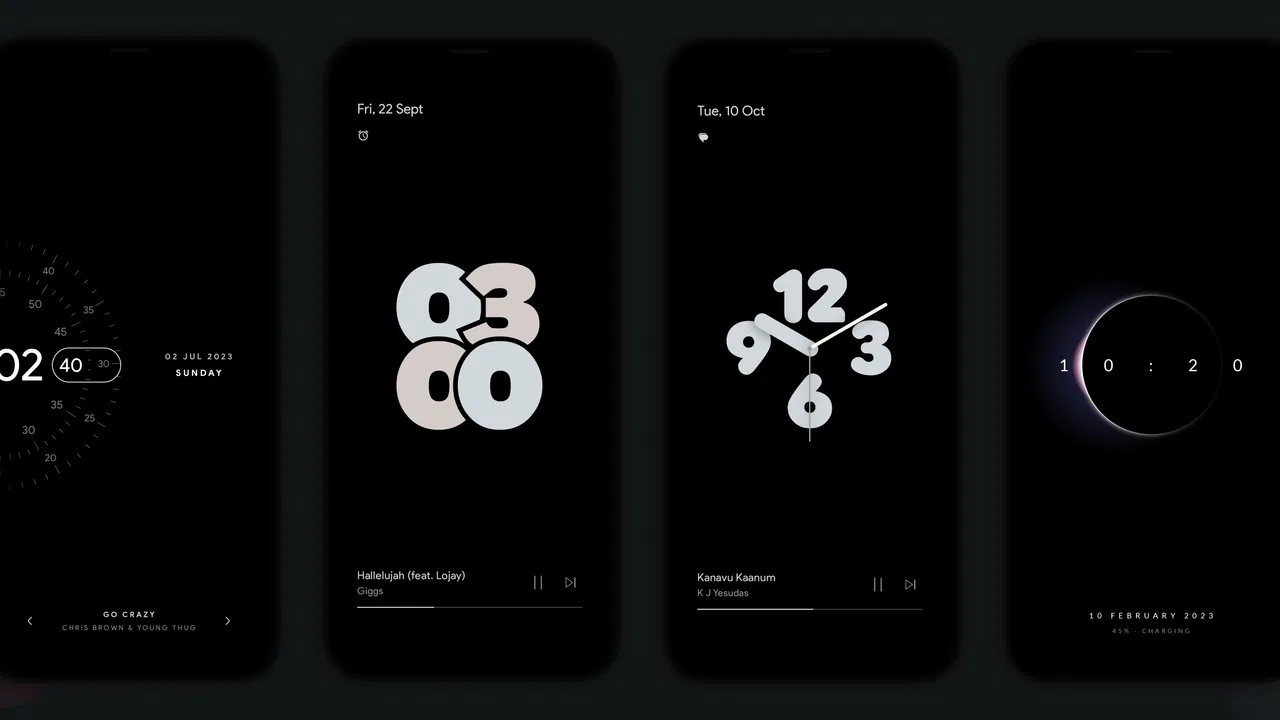
The central idea is straightforward: use the edges and idle display as a visual canvas. Instead of leaving the phone looking completely static, you can add an always-on display style or an edge effect that draws attention to the outline of the screen. The music visualizer gives the app another purpose by reacting visually while audio is playing.
I found the strongest appeal in the combination rather than in any single feature. An always-on display by itself is practical, while edge lighting by itself is mostly decorative. Together, they make the phone feel more deliberately customized. The music visualizer adds a different mood, especially when the phone is sitting on a desk or beside you while you listen. It is not a replacement for a music player, and I would not install it expecting deeper playback controls. Its job is to make playback more visual.
That distinction matters. If you want a clean lock screen, the app may feel unnecessary. If you enjoy changing wallpapers, icons, widgets, and colors, it fits naturally into that habit. I see it as a finishing layer for personalization rather than a complete phone customization system.
In a normal day, I would use the always-on display when the phone is placed face-up at my desk. A glance can show that the screen is active without requiring me to wake the device fully. Later, while listening to music, the edge visualizer can provide a subtle animated accent. The useful part is that these are separate situations: one is about quick visibility, and the other is about atmosphere.
There is also a trade-off between visibility and restraint. A bright edge animation can look impressive for a short time, but a calmer effect is easier to live with during work, reading, or sleep. I recommend starting with the least distracting style and increasing the intensity only if you genuinely miss the effect. This is one of those apps where the most attractive preview may not be the most comfortable everyday setting.
Personalization that works best when kept simple
The app is most convincing when you treat it like a visual accent. Matching the edge color to your wallpaper or phone case usually looks more polished than selecting several competing colors. I also prefer using one display style for ordinary use and reserving more animated effects for music. That separation prevents the phone from feeling busy every time I look at it.
A useful workflow is to configure the always-on display first and leave it alone for a day. That gives you a chance to notice whether it is readable from your usual viewing angle and whether it distracts you. After that, add the edge effect and compare the two together. Changing everything at once makes it difficult to tell which part you actually like.
This staged setup is especially helpful on smaller phones or devices with curved edges. The edge effect may appear more prominent on some screens than others, while an always-on layout can be easier or harder to read depending on the panel and the phone’s own display behavior. The app gives you the visual concept, but the hardware still determines much of the final impression.
Where the music visualizer earns its place
The music side is more interesting than a generic animated wallpaper because it responds to what you are hearing. I like it for casual listening when the phone is visible but I am not actively holding it. It can turn a quiet desk setup into something more personal without requiring a separate screen or accessory.
It is less useful when the phone is in a pocket, face down, or across the room. In those situations, the visual response is simply invisible. That sounds obvious, but it is an important reason not to judge the app solely by the visualizer. Its value depends on how often your phone is placed where the display can actually be seen.
I would also avoid treating the visualizer as a reason to keep the screen awake unnecessarily. The effect is fun, but it should complement listening rather than encourage constant checking. If you are trying to reduce screen time, the always-on and animated elements may work against that goal, even though neither is essential to using the phone.
What the current version means for new and existing users
Version 2.1.4.0 is the current release, and the app has been available since November 28, 2019. That history gives it a more established feel than a newly launched personalization tool. For someone installing it today, the benefit is a concept that has had time to settle into a recognizable product rather than an experiment with only one visual trick.
At the same time, I would not assume that a current version automatically means the experience will be identical across every Android phone. Android 9 is the minimum operating system, but manufacturer software can change how always-on displays, battery restrictions, lock screens, and visual overlays behave. A setting that feels immediate on one handset may require more adjustment on another.
Existing users should approach an update with a practical mindset: check the appearance after updating rather than assuming an old layout or effect will look exactly the same. Personalization apps are sensitive to system changes because they sit close to areas that phone makers frequently customize. If an effect seems missing, the first useful step is to revisit the app’s display configuration and the phone’s own battery or lock-screen settings.
I would also take a screenshot or note your preferred arrangement before making major changes. This is not because the app is difficult to understand, but because visual customization encourages experimentation. Once you have tried several styles, it is easy to forget which combination was easiest to read. Keeping a simple reference saves time when you want to return to a calmer setup.
The developer’s connection with Muviz is relevant here because the app feels designed around visual playback and display decoration rather than general phone management. That focus is a strength. There are fewer unrelated tools competing for attention, and the purpose is easy to understand. The limitation is equally clear: if you want a broad customization suite covering launchers, icon packs, notification automation, and lock-screen replacement, you will need other tools.
What changes for people moving from the usual alternatives
The usual alternative is to rely on the phone’s built-in always-on display. That option is often better when your priority is stability, low complexity, and close integration with the lock screen. Built-in tools may also feel more predictable after system updates because they are part of the phone maker’s software.
Muviz Edge becomes more appealing when the built-in design feels too plain or when you want a stronger visual connection between music and the display. It offers a more expressive direction than a standard clock-and-notification screen. In exchange, you may spend more time tuning the appearance and checking how the effect behaves on your specific phone.
Another alternative is a live wallpaper or a full launcher customization package. Those options can transform more of the interface, but they also affect the home screen and may require a larger commitment. This app is easier to justify if you want a focused change around the display rather than a complete redesign of how the phone works.
For notification lighting alone, some phones already include their own edge effects. In that case, the app’s advantage depends on whether its visual styles and music use are more appealing to you than the built-in option. I would not install it solely because the phone has an edge-light setting; I would install it when the combination of always-on presentation and audio visualization fills a gap in the standard experience.
Small details that affect the real-world experience
The first non-obvious consideration is viewing angle. An edge effect that looks balanced while you hold the phone may appear uneven when the device lies flat or is viewed from the side. I recommend testing the chosen style in the place where the phone normally rests, not only in your hand. This simple check can prevent a polished setup from becoming distracting at a desk.
The second is visual hierarchy. If the always-on information is difficult to read because the decoration is too strong, the personalization has gone too far. I prefer making the information the quiet center and letting the edge act as a frame. This approach keeps the feature useful instead of turning every glance into a light show.
The third is separating “looks good in a preview” from “works during a routine.” A dramatic animation may be enjoyable during a song, but it can feel excessive during repeated notifications or long periods of idle time. I suggest using a restrained default and changing it only for specific occasions, such as listening sessions or when showing the phone to friends.
A fourth practical point is troubleshooting by layers. If the edge effect does not appear, first check whether the always-on or overlay behavior is enabled, then check the phone’s battery management, and finally test the effect with a different display arrangement. Changing several system settings at once makes it harder to identify the cause. This layered approach is faster and avoids unnecessary resets.
Finally, remember that optional purchases are part of the experience. The app is free, but some personalization may be offered through individual purchases priced between $0.99 and $4.99. I would explore the free experience first and only pay for a style that solves a specific preference. Buying several visual options quickly can make the app feel less like a focused tool and more like a collection of small upgrades.
Who should use it, and who should skip it
I think it is a good match for people who enjoy subtle phone customization, keep their device visible on a desk or bedside table, and want music playback to have a visual component. It is also a sensible choice for someone who likes the idea of an always-on display but finds the phone’s default presentation too ordinary.
It is less suitable for anyone who wants the lowest possible distraction, prefers every feature to be built into the operating system, or is actively trying to minimize animated screen activity. People who rarely look at their phone while it is playing music will probably get little from the visualizer. Likewise, users who already love their built-in edge lighting may not gain enough to justify another personalization layer.
I would also be cautious if your main goal is battery conservation. The app’s visual purpose naturally involves display activity, so it is not the first choice for someone who treats every extra screen element as a cost. The sensible approach is to use the effects selectively and decide whether the visual benefit is worth that trade-off on your own device.
What I would watch as the app continues
The most important thing to watch is how well the experience keeps pace with Android and manufacturer changes. Because the app works around the display and lock-screen experience, compatibility matters as much as visual variety. A future update will be most valuable if it keeps existing styles dependable while making setup clearer for newer phones.
I would also look for continued attention to control. The best version of this concept is not the one with the most animation; it is the one that lets me choose exactly when the effect appears, how strong it feels, and whether it remains readable. Better separation between everyday display use and music-focused decoration would make the app easier to live with.
For current users, the practical expectation should be steady personalization rather than a completely new phone interface. The app’s identity is already clear: it adds visual character to idle display time and music playback. That focus is likely to remain its main advantage, provided the experience stays compatible and does not become unnecessarily complicated.
After using it, I see Muviz Edge as a focused personalization app with a clear audience. It does not replace the phone’s core tools, and it is not essential for people who prefer a quiet, built-in display. But if you want your phone to show more personality around the edges and enjoy seeing music represented visually, it offers a more engaging option than the standard always-on screen.
My recommendation is to start free, choose a restrained design, and test it where you normally leave your phone. If the edge lighting improves that everyday moment without becoming a distraction, the app has earned its place. If you find yourself disabling the animation after a day or two, the built-in display is probably the better fit. That is the honest dividing line: this is worthwhile when visual atmosphere matters to you, not when you are looking for a purely practical display utility.
FAQs for Muviz Edge: AOD & Edge Lights
01What is Muviz Edge: AOD & Edge Lights, and what does it do?
Muviz Edge: AOD & Edge Lights is an Android customization app that adds animated lighting effects around the edges of your screen. It can display colorful borders when notifications arrive, while charging, or when music is playing. The app also includes always-on display options, clock styles, wallpapers, and visualizers designed to make compatible phones look more personal and eye-catching.
02Does Muviz Edge work on every Android phone?
Muviz Edge is designed for many Android smartphones, but the available features can vary depending on the device, Android version, screen shape, and manufacturer settings. Edge lighting and always-on display functions may behave differently on phones with curved, flat, AMOLED, or LCD screens. Before downloading, users should check whether their device supports the required notification, overlay, and display permissions.
03Does the app drain the battery or affect phone performance?
Muviz Edge may use additional battery because it can keep visual effects active, monitor notifications, display always-on elements, or run animations during charging and music playback. The impact is usually manageable when effects are limited, but brighter animations and longer display times can consume more power. Users concerned about battery life can reduce animation intensity, disable unnecessary triggers, or use the app only for notifications.
04Is Muviz Edge free to use, or does it include paid features?
The app can generally be downloaded and used with a selection of free edge-lighting effects, clocks, and customization tools, although the exact offering may change with updates. Some premium designs, advanced controls, or ad-free features may require an in-app purchase or subscription. It is worth reviewing the current Google Play listing carefully so you understand which content is available without payment.
05What permissions does Muviz Edge require, and are they safe to grant?
Muviz Edge may request permissions such as notification access, display-over-other-apps access, and permission to run while the phone is active or charging. These permissions allow the app to detect notifications and show lighting effects over the lock screen or other interfaces. Users should grant only the permissions needed for their preferred features and review Android settings if they later decide to disable access.
Pros
- Highly customizable edge-lighting colors
- patterns
- and animation styles.
- Works with many notification types
- including calls and messaging apps.
- Supports screen-off edge effects on compatible AMOLED devices.
- Offers useful always-on display clock and notification layouts.
- Can match lighting effects to wallpapers or selected app icons.
Cons
- Some features may require premium access or in-app purchases.
- Compatibility varies across phone brands and Android versions.
- Continuous AOD and lighting effects can increase battery consumption.
- Notification access permissions may concern privacy-conscious users.
- Setup can take time because of the many customization options.

Muviz Edge: AOD & Edge Lights
Gallery